



It used to be a lot more difficult tracking embedded Youtube video plays using Google Tag Manager. You either had to write your own custom script to listen for the actions, or use one kindly written and shared by some of the wonderful people within the analytics community.
Thanks to Google and the new built-in video tracking triggers and variables, it’s thankfully much, much easier in 2018. Although it is significantly easier now, there are still quite a number of variables and events to be tracked and ways they can be combined together – so the guide below explains how we’ve gone about it, allowing us to essentially track all of the important video actions using just the one tag.
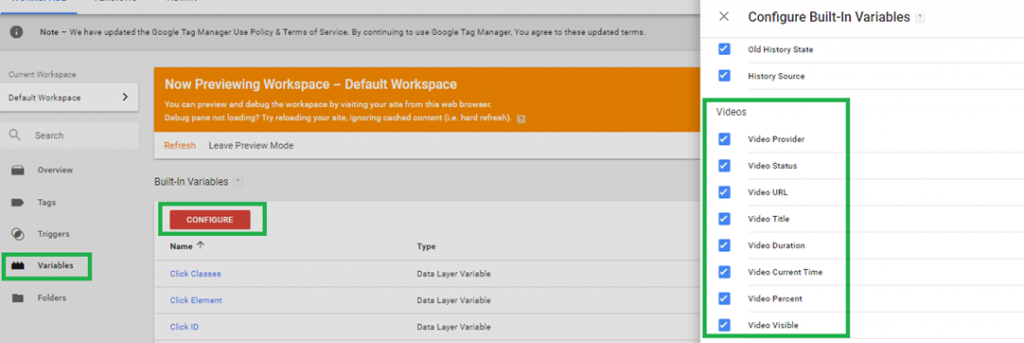
1. Enable all of the new built-in video variables
These aren’t enabled by default, so you’ll have to go in and tick all of the boxes in order to see the variables and their associated values whenever a video interaction takes place.
2. Set up your Youtube Trigger
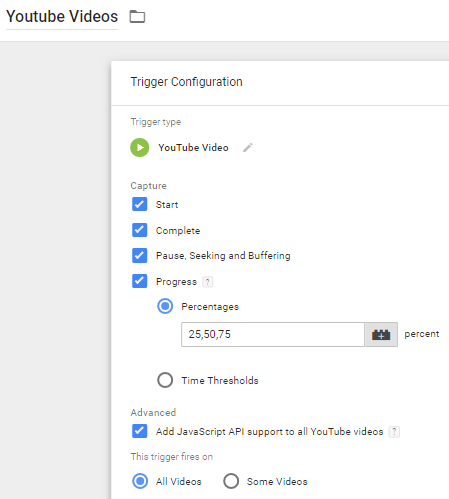
We use the setup below – we’re most interested in knowing each time 25% of a video is viewed, although you can change this to be other percentages or time values if you prefer. Also tick the box to add API support as this simply means GTM will append the relevant parameters to enable video tracking if they’re not there already.
3. Create a Lookup Table for the Video Actions you want to track
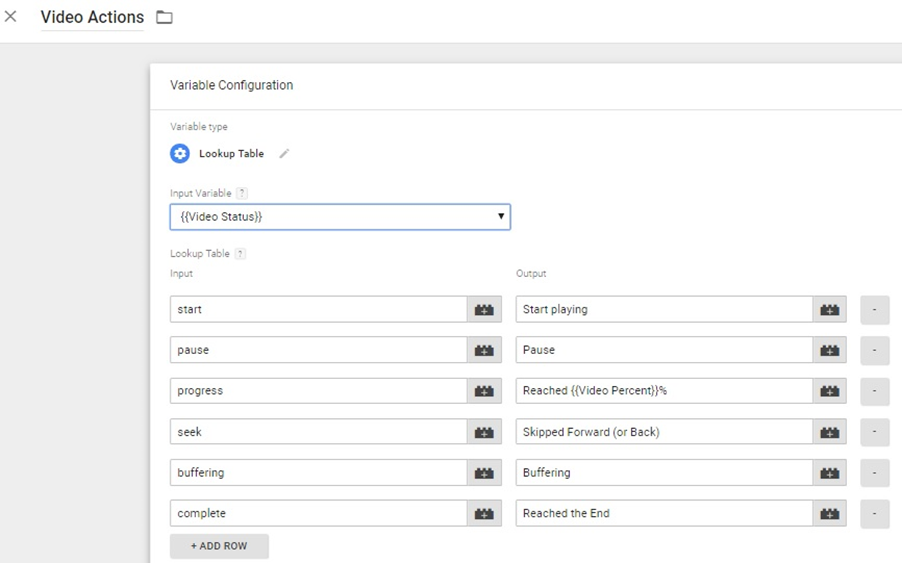
We saw from Step 1 that we have a number of video variables to play with – and we also know that when we’re setting up a Google Analytics event tag, we’ve only got 3 slots to fill in, the Category, Action and Label. This Lookup Table will allow us to populate the event tag appropriately for each action, all within the one tag. This is the step where the magic happens…
From the table below, you’ll see that we’re using the built-in {{Video Status}} variable, which gives us basic actions (start, pause, progress, etc) – we’re then renaming those actions in a more user-friendly manner and adding the {{Video Percent}} viewed to the output when a video progress action takes place.
4. Create the Google Analytics Event tracking tag to send the appropriate data to Google Analytics
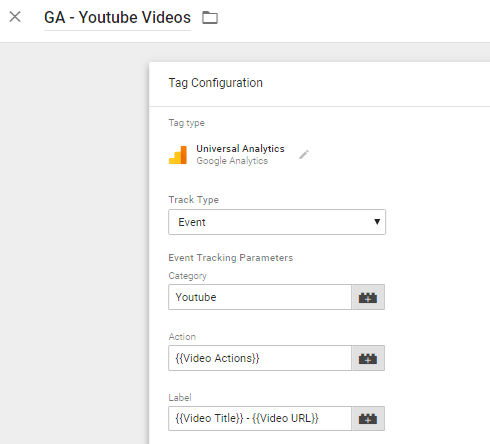
We’ve used {{Video Actions}} as the Event Action – which is the resultant output from the Lookup Table above and for the label, we’ve combined both the {{Video Title}} and the {{Video URL}} so you can easily see at a glance which video has been viewed, and its URL, within the reports.
Once you’ve created the tag, all you have to do is associate it with the trigger we created in Step 2.
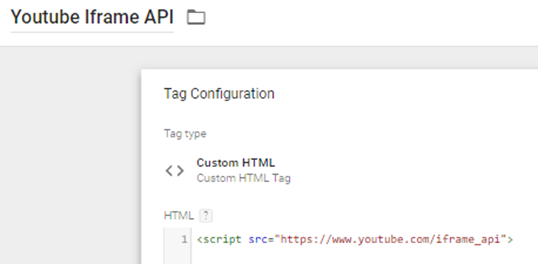
Note: in some rare instances – for example, when a Youtube video loads dynamically in a pop-up/lightbox style display, you’ll also need to ensure this Custom HTML tag is fired on the initial page load before the user action takes place which brings the Youtube video into display.
It doesn’t happen very often, but if you find your Youtube videos aren’t being tracked and your website loads content dynamically, try firing this line of code on the page first.
If you have any problems following the steps above, let us know – either in the comments below or via email – we’re always happy to help.

Hi i have implemented the Inbuilt GA Youtube tracking, but for some reason it doesn’t trigger every time when a video is played. Do you know what might be the reason for this inconsistent behavior.As you had suggested, i did implement custom html for youtube api, still no use. please advise.
Hi Ravi,
It’s hard to know without more details but the first thing to ensure would be that your firing options are set as ‘Once per Event’ under the tag’s Advanced Settings. If you’ve also installed the additional Custom HTML script – ensure it’s fired immediately on the page load too.
Otherwise it may be how the videos have been embedded – make sure they don’t have enablejsapi=0 included.
If it’s still not working, feel free to pop me an email with the URL of the site and I’ll see if I can figure out what’s happening.
Hi there – trying to follow your instructions and on the website I am trying to track the videos do appear in a pop-up. I have created the custom html tag but when you say ensure it is loaded first I am a little lost? How would this be done?
Hi Allie,
It will most likely be fine if you just add the line of code and set the trigger so it fires on Page View.
If that doesn’t work, you can also set the Tag Priority to ensure it fires before the other video tracking tag: https://support.google.com/tagmanager/answer/2772421?hl=en
Would I be able to create a Google Ads remarketing list of people watched 50% of the video?
Absolutely. You’d just create an audience for people matching the Event Category (e.g. Youtube) and Event Action (e.g. 50%) – just match them up to whatever your own naming conventions are.
My tag is being fired and I can see results in datalayer in debug mode on my client’s site. But in variables section, my event category, action, label and value are undefined and hence, I can’t see any results in top events GA. Please help me with what I am doing wrong.
Hi Shreya,
Hard to know based on the information provided… could you share a preview link or some screenshots of your setup? Feel free to do so via email ([email protected]) and I’ll have a look for you.
Hi,
Has anyone found a way to track mute/unmute clicks in YouTube videos? I would love to be able to track this for a page that starts a video on mute.
Thanks!
Bryan
Hi Bryan,
I’m not aware of an easy way to track this but it looks like it would be possible using the Youtube API:
player.isMuted():Boolean
Returns true if the player is muted, false if not.
More info here: https://developers.google.com/youtube/iframe_api_reference#Playback_controls
I’m having trouble getting this approach to work tracking the video at this URL. Would appreciate any help you can give.
I have created tags, triggers and custom HTML you mention above but I see no tag firing. Thanks so much.
http://www.buffalo.edu/about_ub.html
Hi Tracey,
Are you sure you’ve followed the steps exactly as listed? I did a few tests on the site linked and it looked like it should work okay for you.
If you’re still having problems, feel free to email me ([email protected]) some screenshots of your setup and I’ll see if I can help.
Hi,
I also have a problem tracking a youtube-video that is in a pop-op window.
When I debug I can see the Youtube Iframe API tag, but it wont trigger my youtube-event (play, pause, ect.).
I am using the built-in Youtube event in GTM and had also made sure that “enablejsapi=0” is =1.
What else can I do?
Thank you!
Can you share the URL so we can take a look? Feel free to send via email ([email protected])
Hi,
I am quite new to GTM so this might be a no-brainer for you, however I was confused about where you implemented the Youtube tag itself/ the code? Thanks.
Hi Dilara,
All of the above actions take place within the Google Tag Manager interface itself.
So just to clarify, you need to have embedded the youtube video on your website in the first instance – so go to youtube, grab the embed code for your video and then insert it on your site wherever you want the video to be (either by editing the code directly or via your CMS such as WordPress, however you usually add stuff to your website!)
Once the Youtube video is on your site – and assuming that you also have GTM installed on the same page on which the Youtube video is embedded – then you can just follow the steps above to track those Youtube video interactions in Google Analytics. Step 4 above is setting up the tag that sends the data through to GA.
Hi Michel,
I have implemented the Inbuilt GA Youtube tracking, but for some reason, it doesn’t trigger every time when a video is played. Do you know what might be the reason for this inconsistent behavior As you had suggested
check page here – https://www.rms.com/programs/us-flood
Hi Dipti,
Does it work sometimes? If so, it might be that the Youtube API code isn’t always added to the page fast enough before the videos are loaded.
You could try adding the Youtube API code directly to the site code itself, ensuring it’s above the videos…
Hi Michael,
I followed all the steps that you have mentioned, but i have checked in GTM debugging No video tag & variable tag fired.
Please help me this.
is this any video popup issue?
https://www.pvrcinemas.com
Hi Deep,
Yes, it looks like an issue caused by the way the videos are embedded. I’m not sure if there’s an easy fix here, unfortunately.
youtube iframe code worked like a charm! Amazing post!
For the tag, what do I put under “Value” and “Non-Interaction Hit” and “Google Analytics Settings”. For the “Google Analytics Settings” dropdown, it says “Select Settings Variable…” and “New Variable” Should I override it with my Tracking ID?
Leave the Value field blank, and Non-Interaction as false (unless you don’t want to consider a video view an interactive event for whatever reason).
For the Google Analytics Setting dropdown, select your GA settings variable. Or if you don’t have/use a GA settings variable, you can override and input your Tracking ID. Whatever you typically do here is fine.
Hi Mark, https://www.prevention.org/a-dose-of-truth fires the API first, but not the video tag. Any ideas?
Try amending the video trigger so that ‘Enable this Trigger On’ is set as ‘Window Load (gtm.load)’. I’m not sure if this will help but it might.
Otherwise, the only other solution really is to embed your videos without using the popup modal as that’s what’s causing the issue.
Hey Michael,
Thanks a lot for the process, was really resourceful.
To others, follow the above steps because it does work!!
If one is an advanced GTM user the below should make sense.
Make sure to have these configurations too:
– In the youtube trigger have window load (gtm.load) enabled
– fire custom iframe API on all pages, pageview
– In GA Event tag, check tag sequencing and select the setup iframe API tag to fire before the GA youtube events
– customize the youtube trigger using data layer variables
– customize GA event (Cat, Act, Lab) and fire with the customized youtube trigger.
You’re the MAN Michael!
Ha, thanks Jimmy! 😀
Just a quick note – as long as you have the Youtube API loaded before any of the Youtube events take place (i.e. fire the Custom HTML tag with the API on Page View, DOM Ready or Window Loaded) then the tag sequencing shouldn’t be needed – but thanks for the additional configuration suggestions!
Hello,
I’m trying to set this up for a pop up video player is not working. Im not even seeing the gtm.video event, just a link click event when I click on the “watch video” button, then the player is open as a pop up and it doesnt track the event. What can I do?
Hi Leslie,
Assuming it’s for the link you’ve left in your profile, I’m actually not sure if there’s a solution. Perhaps your developers could come up with something.
The recurring theme with people having issues with tracking Youtube embeds is that they’re using some kind of modal/pop-up rather than a standard embed. If you want to track this video, I’d suggest changing the way it’s embedded, or just setting up a tag to track clicks on the ‘watch video’ button using the link click trigger.
Hi,
I have has great success in following the instructions and I have previewed the workspace and I can see that all of the tags are firing correctly.
I am just unsure on how to view the data. I have gone into Analytics > Behaviour > Events but from here I can only see when tags have been tracked, but they are not divided by start, complete, pause, etc. How do i view this info?
Thanks Michael!
Hi Mason!
The good news is that it sounds like you’ve done the hard part. 🙂
If you’re in GA, under Behaviour -> Events, you’ll likely see the Event Category ‘Youtube’.
If you click on that, you’ll then see the Event Actions, which is where you’ll see ‘Play’, ‘Pause’, etc.
You can then go one step further and click on any of those to see the Event Label, which should be the title of the video.
If you’re unfamiliar with GA Events, I’d recommend reading this guide: https://support.google.com/analytics/answer/1033068?hl=en
Hello!
I’m new to GTM and found your post very helpful. I’ve gone through the steps, included the custom code, read all of the super helpful comments, and still cannot get the GA-Youtube video clicks tag to fire on my page. I can see the Youtube Iframe is firing, but nothing else is happening. I also do not see these events in GA, so I’m definitely missing something somewhere. Any help you can provide would be greatly appreciated! My page with this issue is: http://www.butlerautomatic.com/resources – Thank you!
Hi Amanda,
I’ve just replied via email but for anyone else reading this – the Youtube videos on your site are not embedded, they’re just clickable images that link off to watch the video on Youtube.
This tracking guide will only work on embedded videos, viewed directly on your website.
Hi,
I have 4 YouTube videos embedded on a page, and by this method the tag fires only for the first video played. How can I tag all the videos without having to reload the page?
Thank you!
Hi Minal,
This method should work even if there are multiple videos on the page. Are all of your videos embedded in the same way? Are some of them dynamically loaded in later? If you want to share the URL, I can take a look and see why it’s not working – but as I said, it should work.
You are awesome! Thank you a lot! Very nice tutorial!